Enable, Disable, Trust & Verify Providers
SmartHopper treats provider plugins as code — it verifies where they came from before letting them run.
How a provider gets verified
Every SmartHopper.Providers.*.dll next to SmartHopper.Infrastructure.dll goes through three checks before it's usable:
- Signature match (Windows only) — the file must be signed with the same Authenticode certificate and strong-name key as SmartHopper itself. An unsigned third-party DLL cannot load on Windows. On macOS this check is skipped.
- SHA-256 vs the official manifest —
Match,Mismatch(official file changed/tampered),Unavailable(can't reach the hash source), orNotFound(not in the manifest — a third-party or different-version build). Your integrity check mode decides whether a non-Match is blocked or just warned. - Trust prompt — a provider with no stored trust entry asks "A new AI provider was detected — enable it?". Answering no leaves it registered but unusable everywhere (it disappears from Select AI Provider menus); yes marks it trusted.
Trust is stored per assembly name. A file that changes after you trusted it is caught by the SHA-256 check on the next verify/load — not by re-prompting trust.
Enable or disable a provider
- Open SmartHopper → Settings → Security.
- Toggle the provider in the trusted providers list. Untrusted/disabled providers are hidden from every Select AI Provider menu — the assembly still loads, but
GetProviderrefuses to hand it out. - A first-time third-party provider triggers a trust prompt — accept to enable it, decline to keep it blocked.
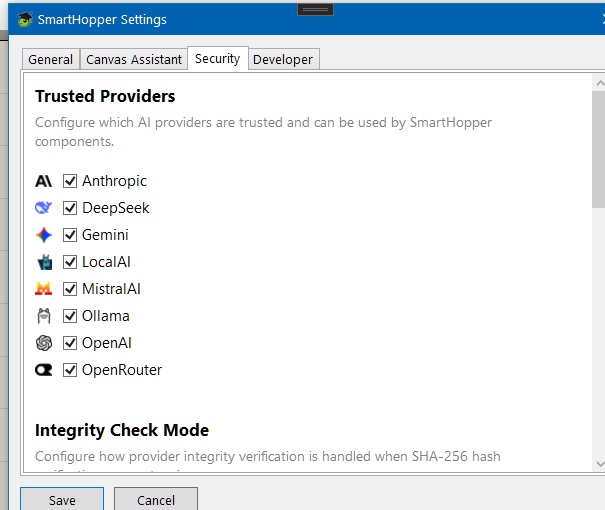
Verify providers
SmartHopper → Verify Providers re-checks every provider's SHA-256 hash against the official manifest and shows the result. Run it after updating SmartHopper or adding a provider plugin manually.
Integrity check modes
The Provider integrity check setting (Security tab) controls what happens when a provider's hash doesn't match the official manifest:
- Soft (default; forced in DEBUG builds) — warn but still load. Required for third-party providers.
- Hard — block on hash mismatch and on providers not in the manifest, but still load if the hash source is unreachable.
- Strict — block on mismatch, unknown providers, and unreachable hash source.
Components using an unsigned or unverified provider show a runtime warning on the canvas so you always know whose code produced an answer.
Refresh after installing providers
Dropped a new SmartHopper.Providers.* plugin next to SmartHopper.Infrastructure.dll (the folder SmartHopper is installed into — typically the Grasshopper Libraries folder)? Use SmartHopper → Refresh Providers to rescan without restarting Rhino.