The SmartHopper Menu
After installation, Grasshopper's menu bar gains a SmartHopper entry.
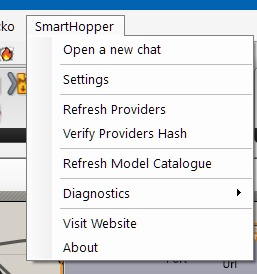
| Menu item | What it does |
|---|---|
| Settings | Opens the SmartHopper settings dialog — default provider, provider API keys/endpoints, assistant behavior, and logging. See Settings reference. |
| Refresh Providers | Re-scans provider assemblies and re-initializes providers. Use after dropping a new provider plugin into the components folder. |
| Verify Providers | Checks the integrity (signature and hash) of every discovered provider and reports which are official, community, tampered, or invalid. See Enable & disable providers. |
| Diagnostics | Diagnostics helpers and, in debug builds, a shortcut to the log folder. See Troubleshooting. |
| About | Version, build, and licensing information. |
Where settings are stored
Settings live in SmartHopper.json under the Grasshopper roaming profile (%APPDATA%\Grasshopper on Windows). Secrets such as API keys are stored encrypted via the OS secure store (DPAPI on Windows, Keychain on macOS) — they never appear as plain text.