Write a Script with AI
SmartHopper can generate, update, and review Grasshopper script components in Python 3, C#, VB.NET, and IronPython — complete with input/output parameters, type hints, access modes (item, list, tree), and validated code.
Prefer video?
Watch the Generate & Edit Script Components video for a full walkthrough.
Option 1 — Ask the Canvas Assistant
The fastest way to create or iterate on a script is through the Canvas Assistant:
- Open the Canvas Assistant and describe what you need — for example: "Create a Python 3 script component that takes a curve
Cand an integerN, divides the curve intoNequal segments, and outputs the division pointsPtsand segment lengthsL." - The assistant generates the complete script component and opens the canvas change review dialog. Click Apply selected to place it on your canvas.
- To refine it later, select the script component on the canvas and ask a follow-up such as "Update the selected script so it also outputs the tangent vectors at each point." The assistant updates the component in place while keeping its wires connected.
Be specific about inputs and outputs
Naming your expected inputs, their data types (Curve, Point3d, int, double), their access (item, list, tree), and the desired outputs produces the cleanest scripts on the first try.
Option 2 — Use the Script components on the canvas
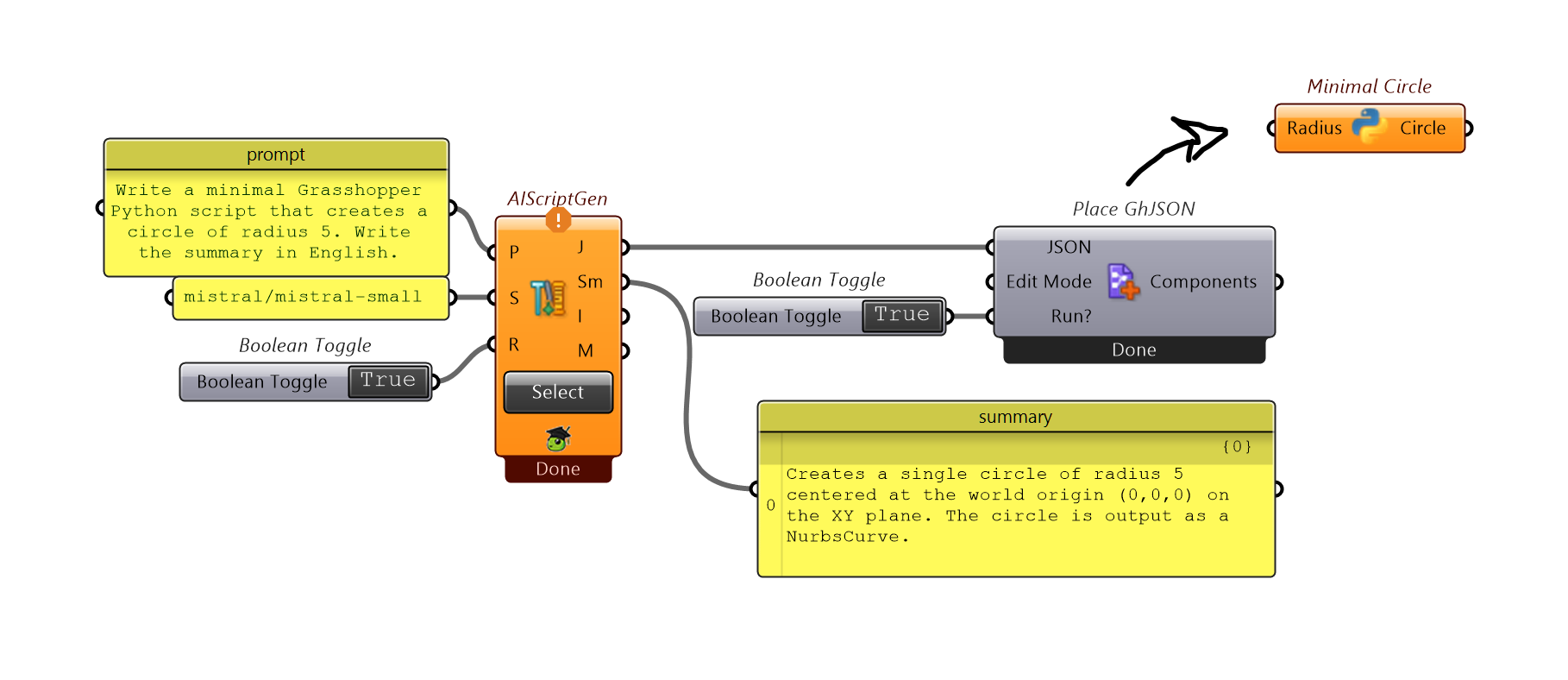
When you want script generation or review wired into a repeatable Grasshopper definition, use the components in SmartHopper → J. Script:
| Component | Nickname | How to use it |
|---|---|---|
| AI Script Generate | AIScriptGen | Wire instructions into Prompt to generate a new script component as GhJSON (then wire GhJSON into Place GhJSON to add it to the canvas). Or click Select Components to pick an existing script component on the canvas and update it in place. |
| AI Script Review | AIScriptReview | Click Select Components to pick an existing script component on the canvas and run both static code checks (Coded Issues) and an AI review (AI Review). |
| AI to Script | AI→Script | Located in C. Output — returns raw Python or C# code as text from any Input → Output pipeline. |
Checking and debugging generated scripts
- Automatic static validation: Before SmartHopper returns a generated script, its built-in validator checks the parameter configuration and code structure.
- Run a second opinion: Use AI Script Review (or ask the assistant "Review this selected script for bugs or API mistakes") before relying on generated code in a production file.
- Fix runtime errors in place: If a script component turns red on the canvas, select it and ask the assistant "Why is this script failing and can you fix it?" — the assistant reads the component's runtime error message and proposes an in-place fix.