Assistant Settings
Configure how the Canvas Assistant behaves under SmartHopper → Settings → Canvas Assistant.
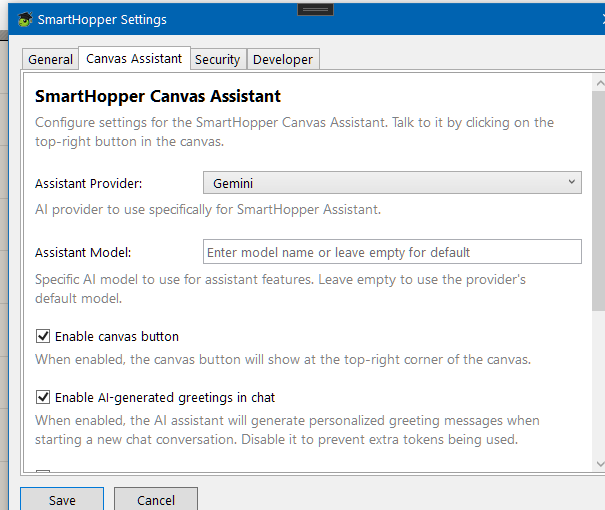
Settings overview
| Setting | Default | What it controls |
|---|---|---|
| Provider | (empty → Default AI provider) | AI provider used by the Canvas Assistant. Leave empty to follow the global default provider on the General tab. |
| Model | (empty → provider default) | Model used by the Canvas Assistant. Pick a model that supports tool calling. |
| Canvas button | On | Shows or hides the SmartHopper assistant button on the Grasshopper canvas toolbar. |
| AI greeting | On | Generates a brief, context-aware greeting when you open a new chat session. |
| Suggested prompts | On | Displays clickable follow-up prompt suggestions after each assistant reply. |
| Max autonomous time | 10 min | Maximum wall-clock time allowed for a single multi-step assistant turn (0 disables the limit). |
| Max autonomous tokens | 300,000 | Maximum combined input + output tokens allowed for a single multi-step assistant turn (0 disables the limit). |
Choosing the right model for the assistant
Because the assistant reads your canvas, searches forums, and proposes edits by calling AI tools, it needs a model with reliable tool calling (function calling) support. If you pick a model that does not support tool calling, the assistant can still chat in plain text, but it won't be able to inspect or edit your Grasshopper document.
Controlling cost on long tasks
When you ask the assistant to complete a multi-step task (such as building and verifying a complex script), it can chain several tool calls in one turn. Max autonomous time and Max autonomous tokens act as safety circuit breakers: if a turn reaches either limit, the assistant stops cleanly and summarizes what it completed so far.